
Literature Review
Central processing unit Memory Video generation Sound Input and Output In the Commodore 64, the central processing unit (CPU) is a 6510 microprocessor chip. It executes the same instruction set as a 6502 microprocessor as used in Apple and ATARI computers. It runs with a clock frequency of 1.0225 MHz. For all practical purposes, this can be considered to be a 1 MHz clock. The 6510 has an addressing range of 65536 bytes (64K). There are two different types of memory in the Commodore 64. It has 64K of dynamic RAM, which can be banked into the address space of the other chips as necessary. There is also 20K of ROM in the system. In this ROM are the BASIC programming language and the operating system of the Commodore 64. The operating system is responsible for reading the keyboard, updating the real-time clock, and transferring data in and out of the system, among other things. Since the CPU can only address 64K of memory, all of the RAM cannot be accessed simultaneously with all of the ROM. 1b overcome this problem, the technique of bank switching is used. For instance, if you are not using BASIC, there is no need for the BASIC ROM to be accessible. In this case, it can be replaced with RAM. The CPU cannot tell the difference, so it can be “tricked” into addressing more then 64K of memory. Video generation is a task that is taken care of by a 6567 Video Interface chip (VIC 11).
All of the various graphic modes of the Commodore 64 are generated by this chip. In the process of generating the video signal, the VIC-II chip refresh~ the dynamic ram chips used in the system. The VIC-II chip also generates the system, clock from the 8.18 MHz dot clock. Sound is generated by a 6591 Sound Interface Device chip (SID). This chip can generate 3 independent voices each in a frequency range of 0 to 4 kHz. This corresponds to a range of about 9 octaves. Each voice has an independent volume envelope and a choice of waveforms. The SID chip can also provide
a number of filtering options for use with its own signals or an externally supplied signal. Input and output functions are handles primarily by a pair of 6526 Compkx Interface Adapter chips. Serial communication functions as well as the parallel port are maintained by these chips. They also handle input from the joysticks and the real time clock. These chips each provide a pair of independent 16-bit timers. H you understand how these four devices work, you can make the computer do anything it is capable of. Your program will be primarily concerned with the VIC-II chip and the SID chip. The CPU is the chip that the program is written for, and it is directed to modify the registers in the other chips at the appropriate time for the intended function. Writing almost any type of program eventually comes down to controlling just a few chips. Once you control the major chips the rest of the program should be easy.
6510 ARCHITECTURE In order to program in assembly language, you must understand the internal functions of the microprocessor.
The value of the program counter is output on the address lines of the microprocessor whenever a data access is to be performed on the systems memory. In the Commodore 64, all of the hardware registers appear to be memory locations to the microprocessor, so accesses to hardware registers and memory appear identical. The accumulator is the most important register in the computer. Almost all of the data that passes through the system goes through the accumulator. Every arithmetic function, other than incrementing and decrementing, is performed in the accumulator. Data can be read into the accumulator from memory, modified, and stored back into memory. The X and Y registers are very similar. They move data in a manner similar to the accumulator. They can also be used as an index to an array of data. It should be noted that while these two registers are similar, their functions are not identical. Some instructions require the use of the X register while others use the Y register.
INSTRUCTION TYPES There are 4 classes of instructions in the 6510. These are:
• Data movement
• Arithmetic
• Testing
• Flow of control
Data movement instructions are instructions that cause a value to be loaded from memory, stored into memory, or transferred from one register to another. There are a number of options as to how the address of the byte to be loaded will be determined. In the load accumulator instruction, LOA, there are eight different addressing modes that can be used to determine which byte to load. The different addressing modes are explained in the following section. Arithmetic instructions are used to modify data in some way. This class of instruction includes logical operations, such as the ANO and ORA instructions. There are instructions that allow a byte to be rotated as well as addition and subtraction commands. As with the data movement instructions, most of the available addressing modes can be used by the arithmetic instructions.
testing instructions allow a nondestructive test of data in the microprocessor. For instance, when a CMP instruction is used to check a value in the ACCUMULATOR, the data in the ACCUMULATOR will not be changed in any way. The bits in the STATUS register will be changed in the same way as if the data to be compared was subtracted from the ACCUMULATOR.
These instructions are generally used to modify the STATUS register prior to executing a branch instruction. Flow of control instructions are the branching and jump instructions. These are used to change the order in which different sections of code are executed. The branch instructions are all conditional branching instructions. That is, each instruction checks one of the bits in the status register and, depending on its value, will either branch to the instruction pointed to in the operand or execute the next instruction in line. Jump and jump to subroutine instructions also fall into the flow of control category. These are known as absolute commands because they do not check any conditions before performing a jump.
Significance of the Study
Symbolic instruction node and despite its ease of mastery, it is quite capable of performing most home computing tasks. BASIC is high level programming languages like FORTRAN, Pascal, and COBOL, These languages are often called problem oriented languages because they are intended to be used for solving problems in various fields such as mathematics, science or business. The counterpart of problem-oriented languages are the machine-oriented languages such as FORTH, and require more detailed knowledge of the computer hardware. Machine language is the extreme member of this category of languages. By itself, the Commodore 64 cannot understand BASIC at all. How can it execute the BASIC commands that you type in at the keyboard if it doesn’t speak BASIC? The Commodore 64 contains an “operating system” which includes BASIC interpreter. This interpreter converses with you in BASIC. The Commodore 64 converts the BASIC commands and statements into series of executable machine language instructions. You don’t even see this happening. It takes place “automatically”. Let’s take look at simple example of how the BASIC interpreter works:
If the interpreter finds the keyword in the command table, it knows what part of the operating system is to carry out that BASIC command. In our example, the interpreter searches the command table for the word PRINT. It finds the keyword and notes that the memory location which performs the PRINT statement begins at location 43680. Therefore, the interpreter lets the “program” segment (usually called routine or machine-language routine) located at 43680 perform the PRINT command.
Arrays (subscripted variables) offer powerful extension to the concept of vari ables and are worth mastering for many serious applications. They provide single name for whole series of related strings or numbers, using one or more subscripts to distinguish the separate items or elements.
Effective Programming in BASIC One-dimensional arrays have single subscript, which may take any value from to the value used in the DIM statement that defined the array (or 10 if DIM wasn’t used). The line: DIM A$(50), N%(100), SX(12) defines three arrays: string, integer, and real number, respectively. Space is allocated in memory for them, except for the string arrays. Arrays can be visualized as set of consecutively numbered pigeon holes, each capable of storing one value, and initialized with contents 0. typical application is the lookup table. string array might hold values like this:
Purpose of the Study
Chapter 1: Co-array of BASIC
The DIM statement instructs the system to reserve storage space for an array by specifying a maximum subscript (dimension). COJIIIDent: The DIM statement is an executable statement. In fact, it has to be executed in order to be effective. Numeric or string variables may be dimensioned with one or two dimensions. The maximum value for each dimension is 32767, however, the restraints of memory size usually limit this to a much lower value. An array may not be re-dimensioned. When a variable is dimensioned a reference to the same variable name will refer to the array. This is only allowed with certain types of statements (i.e., MAT). In other statements the error “Inconsistent usage” will occur. Any reference to an array beyond the allocated size will cause a subscript error. Arrays are created with a zero element in each dimension, unless OPTION BASE 1 is in effect. For instance, if the array X were dimensioned X(5), there would be six elements in the array with subscripts of 0, 1, 2, 3, 4, and 5. =================================================================================== Examples: 0010 DIM X(20),Y(2,5),A$(5,5) Incorrect Examples: 0010 DIM X(2,2,2) 0020 DIM Y(99999) Explanation: Array X has 21 elements, array Y has 18 elements, string array A$ has 36 elements. Explanation: Can have only 2 dimensions. Maximum dimension is 32767. =====================================================================
https://bitsavers.org/pdf/phaseOneSystems/oasis/BASIC_Language_Reference_Manual_Mar80.pdf
The constants in the DIM statement must be integer (no decimal point) numbers.
The DIM statement is nonexecutable. When the BASIC program is executed (RUN), the information in the statement is used by the compiler to assign memory locations. The DIM statement need appear only before the dimensioned variables. A DIM statement is not always necessary. If a single letter is used as a subscripted variable name with no preceding DIM statement, BASIC will automatically set aside memory space for the name. If the letter is used as a table, BASIC automatically sets aside 11 locations (i.e., as if it has been dimensioned 10). The same name cannot be used as both a singly and a doubly subscripted array; however, the same name can be used as an array (table or matrix) and a simple variable.
1.1 . Arrays Arrays are indexed collections of numbers or strings. Array elements can be manipulated by scalar numeric and string operations (cf. Sections 5 and 6). In addition, entire arrays may be manipulated by matrix statements.
1.2 Array Declarations
1.1.2 General Description An option in the option-statement may be used to define the lower bound for all array subscripts within a program-unit that are not explicitly stated. By use of an option-statement the subscripts of all such arrays may be declared to have a lower bound of zero or one; if no such declaration occurs, the lower bound shall be one. Arrays may have one, two, or three dimensions. The number of dimensions and subscript bounds for each dimension are declared in the declare-statement or dimension-statement. All array-names, except those appearing in a function-parm-list or a procedure-parm-list, shall be declared in one and only one such statement. If not explicitly declared, the lower subscript bound for a given dimension is one or zero, depending on the BASE option. Upper bounds shall always be explicitly declared. A one-dimensional array with subscripts 1 to 10 or 1980 to 1989 or -9 to 0 contains 10 elements. A two-dimensional array with subscript bounds 1 to 10 for each dimension contains 100 elements. Similarly, a three-dimensional array with subscript- bounds 1 to 10 for each dimension contains 1000 elements. A declare-statement can be used to dimension numeric-arrays as well as to declare maximum lengths for string-variables and string-arrays, and to dimension string-arrays. A dimension- statement can be used to dimension arrays, but not to declare the maximum length of strings in string-arrays.
1.3 Syntax
1. dimension-statement
2. dimension-list
3. array-declaration
4. numeric-array-declaration – DIM dimension-list = array-declaration (comma array-declaration)* = numeric-array-declaration / string-array-declaration – numeric-array bounds 65 AMERICAN NATIONAL STANDARD X3.113-1987
5 . bounds
6. bounds-range
7. signed-integer — = =
8. string-array-declaration =
9. option
10. string-declaration
11. numeric-declaration
12 . numeric-function-ref
13. maxsize-argument
14. bound-argument > > > > — = The number of bounds-ranges or three. left-parenthesis bounds-range (comma bounds-range)* right-parenthesis signed-integer TO signed-integer / signed-integer sign? integer string-array bounds BASE ( 0 / 1 ) string-array-declaration length-max? numeric-array-declaration MAXSIZE maxsize-argument / SIZE bound-argument / LBOUND bound-argument / UBOUND bound-argument left-parenthesis actual-array right-parenthesis left-parenthesis actual-array (comma index)? right-parenthesis in a bounds shall be one, two. An array that is named as a formal-array of a defined- function, a subprogram, a program, or a picture-def shall not be declared in a declare-statement or dimension-statement (since the formal-array in the function- or procedure-parm-list serves as its declaration). Any other array shall be so declared in a lower numbered line than any reference to that array or one of its elements. Any reference to an array and its elements shall agree in dimensionality with the declaration of that array in a declare-statement, a dimension-statement, or as a function- or procedure-parameter. No numeric- or string-array shall be dimensioned or declared more than once in a program-unit. If the optional lower bound (the first signed-integer) is included in the bounds-range, it shall be less than or equal to the upper bound (the second signed-integer). If the lower bound is not specified, then the upper bound shall not be less than the default lower bound, which may be zero or one, depending on the BASE option. An option-statement with a BASE option, if present at all, shall occur in a lower-numbered line than any declare-statement or dimension-statement or any MAT statement that uses a numeric- 66 AMERICAN NATIONAL STANDARD X3.113-1987 array-value in the same program-unit. A program-unit shall contain at most one BASE option. If a bound-argument does not specify an index, the actual- array shall be declared as one-dimensional.
1.4 Examples 1. DIM A(6), B(10,10), B$(100), D(1 TO 5, 1980 TO 1989) DIM A$ (4,4), C(-5 TO 10) 10. A$(3 TO 21) * 8 12. SIZE(A,1) SIZE(B$,2) SIZE(X) LBOUND(A) UBOUND(C$,2) 7.1.4 Semantics Each array-declaration declares the named array named to be either one-, two-, or three-dimensional, according to whether one, two, or three bounds-ranges are specified in the bounds for the array. In addition, the bounds specify the maximum and optionally minimum values that subscripts for the array shall have. If a minimum subscript is not explicitly declared and no BASE option occurs within the program-unit, then it shall be implicitly declared to be one. The BASE option in an option-statement is local to the program-unit in which it occurs and declares the minimum value for all array subscripts in that program-unit that are not explicitly declared. If the execution of a program reaches a line containing a dimension-statement, then it shall proceed to the next line with no further effect. String-array-declarations appearing in a string-declaration may include a length-max, which sets the maximum length of each element of the string-array. As with simple-string-variables, if there is no length-max in the string-declaration, then the length-max, if any, of the string-type shall take effect. If there is no length-max in either, then the implementation-defined length-max, if any, shall take effect. The value of SIZE(A,N) in which A is an actual-array and N is an index shall be the current number of permissible values for the Nth subscript of the array named by A (the value of N is 67 AMERICAN NATIONAL STANDARD X3.113-1987 rounded to the nearest integer, and the subscripts of A are indexed from left to right, starting at one). The value of SIZE (A) shall be the current number o.f elements in the entire array A. The value of MAXSIZE(A) shall be the total number of elements of the entire array named by A permitted by the array- declaration . The value of LBOUND(A,N), where A is an actual-array and N is an index, shall be the current minimum value allowed for the Nth subscript of the array named by A. The value of UBOUND(A,N) shall be the current maximum value allowed for the Nth subscript of array A. As in the SIZE function, the value of N is rounded to the nearest integer, and the subscripts of array A are indexed from left to right, starting at one. The LBOUND and UBOUND functions may be called with a single argument, provided that argument is a vector, in which case the values of LBOUND and UBOUND are the current minimum and maximum values allowed for the subscript of the vectorthe word “vector” shall mean a “one-dimensional array” and the word “matrix” shall mean a “two-dimensional array”.
1.6 Exceptions The value of the index in a SIZE reference is less than one or greater than the number of dimensions in the array (4004, fatal). The value of the index in an LBOUND reference is less than one or greater than the number of dimensions in the array (4008, fata 1) . The value of the index in a UBOUND reference is less than one or greater than the number of dimensions in the array (4009, fatal). 7.1.6 Remarks The dimension statement is retained for compatibility with minimal BASIC. All its capabilities are included within the declare-statement. If an implementation supports more than three dimensions, SIZE, LBOUND, and UBOUND should work for those extra dimensions, and an exception should be generated only when an attempt is made to inquire about a dimension beyond those declared. 68 AMERICAN NATIONAL STANDARD X3.113-1987
1.7 Numeric Arrays
1.8 General Description Numeric-arrays in BASIC may be manipulated element-by- element. However, it is often more convenient to regard numeric arrays as entities rather than as indexed collections of entities, and to manipulate the entire entity at once. BASIC provides a number of standard operations to facilitate such manipulations.
1.9 Syntax
1. array-assignment
2. numeric-array-assignment
3. numeric-array-expression
4. numeric-array-operator
5. scalar-multiplier
6. numeric-array-value
7. redim
8. redim-bounds
9. numeric-array-function-ref
10. numeric-function-ref The number of redim-bounds three. > numeric-array-assignment = MAT numeric-array equals-sign numeric-array-expression = (numeric-array numeric-array-operator)? numeric-array / scalar-multiplier numeric-array / numeric-array-value / numeric-array-function-ref = sign / asterisk = primary asterisk > scalar-multiplier? (CON / IDN / ZER) redim? = left-parenthesis redim-bounds (comma redim-bounds)* right-parenthesis = (index TO)? index = (TRN / INV) left-parenthesis numeric-array right-parenthesis > DET (left-parenthesis numeric-array right-parenthesis) / DOT left-parenthesis numeric-array comma numeric-array right-parenthesis in a redim shall be one, two, or A numeric-array being assigned a value by a numeric-array- assignment shall have the same number of dimensions as the value of the numeric-array-expression.
The numeric-arrays in a numeric-function-ref involving DOT shall be one-dimensional. There shall be no more than two redim-bounds following IDN. The numeric-arrays in a sum or difference shall have the same number of dimensions. The numeric-array serving as the argument of DET, INV, or TRN shall be two-dimensional. The numeric-arrays serving as operands for the numeric- array-operator asterisk (matrix multiply) shall be either one¬ dimensional or two-dimensional, and at least one of them shall be two-dimensional.
Examples In the following examples A, B, and C are doubly-subscripted numeric-arrays, X, Y, and Z are singly-subscripted numeric- arrays, and W is a numeric-expression.
2. MAT A = B MAT A = B + C MAT A = B*C MAT A = W * B MAT A = ZER(4,3) MAT A = INV(B) 10. DET(B) 7.2.4 Semantics MAT X = Y MAT X = Y – Z MAT X = A*Y MAT X = w * co: MAT X = ZER MAT A = TRN(B) DOT(X,Y) MAT X = Y*A
Array Assignments and Redimensioning
♦ Execution of a numeric-array-assignment shall cause the numeric-array- expression to be evaluated and its value assigned to the array named to the left of the equals-sign. If necessary, this array shall have its size changed dynamically (i.e., its number of dimensions shall be unchanged, but its size in each dimension shall be changed to conform to the size of the array given by the value of the numeric-array-expression). When the size of a numeric-array is changed dynamically, the current upper bounds for its subscripts shall be changed to conform to the new sizes. That is, new_lower_bound = old_lower_bound new_upper_bound = old_lower_bound + new_size – 1
The new sizes need not individually be less than or equal to the sizes determined in the array-declaration for that numeric-array, as long as the new total number of elements for the numeric-array 70 AMERICAN NATIONAL STANDARD X3.113-1987 does not exceed the total number of elements determined by the array-declaration for that array.
Array expressions. The evaluation of numeric- array-expressions shall follow the normal rules of matrix algebra. The symbols asterisk plus and minus represent the operations of multiplication, addition, and subtraction, respectively. shall The dimensions of numeric-arrays in numeric-array- expressions shall conform to the rules of matrix algebra. The numeric-arrays in a sum or difference shall have the same sizes in each dimension. The numeric-arrays in a product shall have sizes L x M and M x N for some L, M, and N (in which case the product shall have size L x N), or an M element vector and a size M x N matrix (in which case the product shall be an N element vector), or a size L x M matrix and an M element vector (in which case the product shall be an L element vector). All elements in a numeric-array shall be used when evaluating a numeric-array- expression; i.e., each numeric-array shall be treated as an entity. When a scalar-multiplier is present in a numeric-array- expression, the primary shall be evaluated, and then each element of the numeric-array shall be multiplied by this value. If an underflow occurs in the evaluation of a numeric-array- expression, then the value generated by the operation that resulted in the underflow shall be replaced by zero.
Array values. Numeric-array-values shall be assigned to the numeric-array on the left of the equals sign. If no redim is present, the size of the numeric-array generated shall be the same as the size of the numeric-array to which it is to be assigned. If a redim is present, a numeric-array of the dimensions specified shall be generated, and the numeric-array to which it is assigned shall be redimensioned as described in
In a redim-bounds, the values of the indices are the lower and upper bounds of the corresponding dimension in the associated array-value. If the redim-bounds consists of a single index, its value shall be the upper bound, and the lower bound shall be the current default lower bound in effect. If a redim is used with the IDN constant, then it shall produce a square matrix; i.e., the number of rows shall equal the number of columns. If a redim is not used with the IDN constant, the numeric-array being assigned to shall be square.
The ZER constant shall generate a numeric-array, all of whose elements are zero. The CON constant shall generate a numeric-array, all of whose elements are one. The IDN constant shall generate an identity matrix, i.e., a square matrix with ones on the main diagonal and zeroes elsewhere. If only one redim-bounds is used with IDN, then the effect is just as if that redim-bounds had been specified twice. If a scalar-multiplier is used with an IDN, ZER, or CON constant, then the primary (see 5.3) is evaluated and each nonzero element of the IDN, ZER, or CON constant is replaced by the value of the primary. 7.2.4.4 Array functions. The function TRN shall produce the transpose of its argument. An N x M matrix is returned for an M x N argument. The function INV shall produce the inverse of its argument. The argument shall be a square matrix. The function DET shall return the determinant of its argument. The argument shall be a square matrix. The value of DOT(X,Y) shall result in a scalar value, which is the result of the inner product multiplication of the one¬ dimensional numeric-vectors X and Y.
1.8 Exceptions The sizes of numeric-arrays in a numeric-array-expression do not conform to the rules of matrix algebra (6001, fatal). The total number of elements required for a redimensioned array exceeds the number of elements reserved by the array’s original dimensions (5001, fatal). The first index in a redim-bounds is greater than the second (6005, fatal). A redim-bounds consists of a single index that is less than the default lower bound in effect (6005, fatal). The redim following IDN does not specify a square matrix, or no redim is present and the receiving matrix is not square (6004, fatal). The argument of the DET function is not a square numeric matrix (6002, fatal)
The argument of the INV function is not a square numeric matrix (6003, fatal). Evaluation of a numeric-array-expression results in an overflow (1005, fatal). Evaluation of DET or DOT results in an overflow (1009, fatal). Application of INV to a singular matrix, or loss of all significant digits (3009, fatal).
Chapter 2: BASIC Files
2.1 Files
Files are organized collections of data external to BASIC programs. They provide the user with a means of saving data developed during execution of a program and then retrieving and modifying that data during subsequent executions of BASIC programs. The process by which external data is transferred to or from a program is called input or output, respectively. An implementation-defined means shall be provided for the creation, preservation, and retrieval of files. Input and output operations to these files shall perform as specified in this section. This section describes the logical appearance of files and devices to a BASIC program. In some cases, these attributes may reflect physical characteristics, but in general this standard makes no presumptions concerning the physical representation or organization of files or devices. There are four kinds of file-organization: sequential, stream, relative, and keyed. Sequential and keyed files are sequences of records. A relative file is a sequence of record areas, each of which may or may not contain a record. A stream file is a sequence of values. There are three kinds of record-type: display, internal, and native. A display record is a sequence of characters. An internal record is a sequence of typed values. A native record is a sequence of fields, as described by a program-specified template. Display records provide for the exchange of data between systems employing different internal representations for numeric and string values, and also manipulate data in human readable form. Internal records provide for efficient manipulation of data within a single system. Native records provide for the exchange of data among different language processors within a single system. There are three modules provided for file capabilities, based on which combinations of file-organization and record-type are supported. The core module contains sequential display files, sequential internal files, and stream internal files. The enhanced internal module contains relative internal and keyed internal files. The enhanced native module contains sequential native, relative native, and keyed native files. All other combinations of file-organization and record-type are implementation-defined. The distinction between modules is also reflected in the arrangement of the productions for the syntax. Within each subsection, the syntax rules for the core module are
presented first, followed by the additional syntax productions that pertain to the enhanced files modules. Some of the enhanced productions apply only to the enhanced-native module? these are preceded by an “N”. The meaning of certain terms used throughout this section is as follows. A “file element” is an entity, a sequence of which constitutes a file. Thus, for keyed and sequential files, a file element is a record; for relative files, it is a record-area? for stream files, it is a value. Associated with each file during execution is a “file pointer,” which either uniquely identifies a particular file element upon completion of any statement or points to the end of file. If the pointer is at the beginning of the file, then it identifies the first file element, if any. If a file is an empty sequence, then the beginning and end of file are the same, and the pointer identifies this location. Whenever reference is made to the “next” file element, it is understood that if none such exists, the end of file is substituted. For sequential, stream, and keyed files, the “end of file” is the location immediately following the last file element. For relative files, the “end of file” immediately follows the last existing record, and thus identifies an empty record-area. There are five statements that operate on the file as a whole and are thus called “file operations”: OPEN, CLOSE, ERASE, SET, and ASK. There are seven statements that apply to individual file elements and are known as “record operations”: INPUT, PRINT, READ, WRITE, REWRITE, DELETE, and SET with pointer control, including the variations using MAT and LINE. References to “INPUT operations,” “WRITE operations,” and so forth should be understood to include any of the statements using the keyword in question, e.g., “WRITE operations” includes WRITE and MAT WRITE.
The seven record operations can affect (1) data within a file, (2) variables within the program, and (3) the file pointer. PRINT, WRITE, REWRITE, and DELETE affect file data and the pointer. READ and INPUT affect program variables and the pointer. SET with pointer-items obviously affects only the pointer. Not all input and output is to or from a file, as defined above. An implementation may allow file processing statements to apply as well to devices, such as a terminal, a line printer, or a communications line. When the term “file” is used throughout Section 11, it should generally be understood to mean any source or destination of external data (i.e., either a true file or a device). In certain contexts in which it is necessary to distinguish between
from a BASIC program. Within a program-unit, a channel is identified by a channel number local to that program-unit. The channel number is an integer from 0 up to and including some implementation-defined maximum. This maximum shall be at least 99. A file, identified by its file-name, is open if it is currently assigned to a channel and closed otherwise. A channel is active if it currently has some file assigned to it and inactive otherwise. At the initiation of execution of a program, all channels except channel zero shall be inactive. Channel zero shall always be active. Execution of the open-, close-, or erase-statement (see below) for channel zero shall cause a nonfatal exception. Input and output from and to channel zero shall have the same source and destination as input-statements and printstatements that do not contain channel-expressions. Channel zero shall behave as a device with the file-attributes sequential, display, and outin, and without record-setter or erase capability.
2.1 Open-Statement.
The open-statement makes the file identified by the file-name accessible to the program through the channel number specified in the channel-expression. It is implementation-defined whether file names differing only in the case of the letters (upper or lower) denote the same file or different files. Following a successful open-statement, the associated channel shall be active and the file open. An attempt to open a file on a channel that is already active causes an exception. The effect of attempting to open a file that is already open is implementation-defined. The number of channels other than channel zero that may be active simultaneously shall be at least one for implementations conforming to the core, and at least two for implementations conforming to the enhanced file module. After a successful open, a true file shall be accessible in accordance with the associated file-attributes, whether explicitly specified or in effect by default. This accessibility consists of the ability to perform certain operations and manipulate the file pointer in certain ways.
effect as for a true file. In particular, on output, the same data will be generated, and on input, values and characters will be interpreted and assigned to variables in the same way. The ask-statement may be used to determine whether a particular device supports these capabilities. If a file is opened successfully with a given file organization, record-type, and record-size, then closed, and then opened at a later time with a different value for one of these file-attributes, then it is implementation-defined whether the file is thus accessible. Also, for files with record-type INTERNAL or NATIVE, if a different ARITHMETIC option is in effect for the two executions, it is implementation-defined whether the file is thus accessible. Conversely, if a true file is re-opened at a later time with the same values for the file-attributes mentioned and the same collate-sequence, and, for files with record-type INTERNAL and NATIVE, the same ARITHMETIC option is in effect, and the user has employed the implementation-defined means to preserve the file unchanged in the interim, then the file shall be accessible and the contents of the file faithfully preserved. Devices are not required to preserve data. In the foregoing, “same ARITHMETIC option” refers to DECIMAL or NATIVE or FIXED (cf. 15.1), not to the default specification in the FIXED option. If a KEYED file is reopened with a different collate-sequence, an exception results. If a file with record-type INTERNAL or NATIVE opened in one program-unit is accessed by another program-unit with a different ARITHMETIC option, the results are implementation-defined. Implementations must provide true files for which all access-modes are available. Implementations may also support true files for which some access-modes are not available. A device need not support all access-modes. Implementations conforming only to the core module shall accept and process three combinations of file-organization-value and record-type-value, namely, sequential and display, sequential and internal, and stream and internal. The effect of any other combination is implementation-defined. Implementations conforming to the enhanced-internal module shall accept and process, in addition to those of the core module, relative and internal, and keyed and internal.
Chapter 2
Data files are not computer instructions, they cannot be used in the same manner as BASIC program files. In other words, you cannot RUN a data file, SAVE, or LOAD it. Those three commands, when combined with a file name, are the computer’s means of access to BASIC disk files. The obvious question, then, is that if you cannot use RUN, SAVE, or LOAD with data files, how does the computer get the information on the diskette in a data file or back off the diskette from a data file? To gain access to data files, you must use certain BASIC file commands in specific ways, depending on the kind of data file you are accessing. Both sequential and random access data files primarily use four types of commands: (1) OPEN, (2) CLOSE, (3) some way of reading the file (INPUT# or GET#), and (4) some method of writing to the file (PRINT#). Future chapters will examine in detail how each of these is to be used for either of the two kinds of data files. For now, you only need to understand the essential task of each command.
data files are not computer instructions, they cannot be used in the same manner as BASIC program files. In other words, you cannot RUN a data file, SAVE, or LOAD it. Those three commands, when combined with a file name, are the computer’s means of access to BASIC disk files. The obvious question, then, is that if you cannot use RUN, SAVE, or LOAD with data files, how does the computer get the information on the diskette in a data file or back off the diskette from a data file? To gain access to data files, you must use certain BASIC file commands in specific ways, depending on the kind of data file you are accessing. Both sequential and random access data files primarily use four types of commands: (1) OPEN, (2) CLOSE, (3) some way of reading the file (INPUT# or GET#), and (4) some method of writing to the file (PRINT#). Future chapters will examine in detail how each of these is to be used for either of the two kinds of data files. For now, you only need to understand the essential task of each command.
Dartmouth BASIC revolutionized computer programming for the non-experts, who greatly outnumber the experts! It was a simple language, used English words, and gave almost instantaneous response in the days when turnarounds of hours or even days was the norm.
There were fifteen statement types in the original BASIC.
LET Introduces the assignment statement, and is required
PRINT Provides free-form output
END Is required
READ Assigns values to variables from internal data
DATA Introduces internal data
GOTO Does just that, transfers to another line-numbered statement
IF Gives a conditional GOTO
FOR Introduces the looping construct
NEXT Terminates the looping construct
GOSUB Does a GOTO to a subroutine
RETURN Returns from the end of the subroutine
DEF Introduces programmer-defined functions
DIM Allows dimensioning arrays
REM Provides comments
STOP Same as reaching the END statement
In addition, the slightly more recent version of BASIC that we are using includes the INPUT statement.
Arithmetic Expressions
Besides the four standard arithmetic operations, BASIC includes raising-to-the-power, the symbol of which is “^”.
Normal precedence rules are used: Exponentiation, multiply and divide, add and subtract. Left-association is used for multiple operations within a group. That is
(a – b – c) is understood to be the same as ((a – b) – c)
There is one anomoly: a leading minus sign is treated as unary, and has higher precedence that exponentiation, which is contrary to the usual practive. That is
-x^2 is understood to be (-x)^2
(This was repaired in later versions.)
All arithmetic was done in floating point. In the GE-225 and GE-235, this meant a precision of about 30 bits (roughly ten digits) with an base 2 exponent range of -256 to +255.
Functions
Ten numeric functions were provided.
ABS The absolute value
ATN The arctangent
COS The cosine
EXP The exponential, i.e., e^x
INT The integer part (truncating toward 0)
LOG The natural logarithm
RND The next random number
SIN The sine
SQR The square root
TAN The tangent
Arguments for SIN, COS, TAN, and the value from the ATN, are assumed to be in radians.
Error messages are given for arguments out of range for the LOG and SQR functions, although SQR then provides the SQR of the absolute value.
The RND function needed a dummy argument to get past the syntax scanner. That is, RND(0). The argument is ignored.
Variables
Variable names can be a single letter, or a single letter followed by a single digit. This provides for 286 possible variable names.
Arrays
A single letter followed by a “(“ denotes an array element, which may be one or two-dimensional. Without a DIM statement, the default dimensions are 0 to 10 for each dimension.
The DIM statement allows other upper limits, but the zero element is always provided.
PRINT Statements
The PRINT statement allows several quantities, including quoted strings, separated by commas (,) or semicolons (;). If by commas, BASIC moves to the start of the next zone. Zones are 15 characters in width. If by semicolons, BASIC does not move but starts the next item at the next space.
Numerical values are printed with either a leading space or a minus sign, and with a trailing space. Thus, numerical values in a PRINT statement with semicolons as separators will have at least one space between values. Furthermore, numeric values will always produce a number of characters that is a multiple of three. Thus,
PRINT 12; 34; 56
will produce
12 34 56
While there is no string data type, quoted strings are allowed in PRINT statements. If a quoted string and a numeric value are separated by a semicolon in the PRINT statement, the semicolon may be omitted.
If the material on the printed line exceeds 75 characters, an end-of-line is automatically introduced. We sometimes say that the MARGIN is 75.
Defined Functions
The user may define up to 26 new functions, giving them names from FNA to FNZ. Each such function is introduced by the DEF keyword. There must be exactly be one argument. The variable name used as an argument is distinct from the variable with the same name in the rest of the program. The function definition must be a single line with the following form:
DEF FNX(X) = <expression>
The expression should contain an X unless the function value does not depend upon an argument; the expression may contain other variables from the program.
DEF statement may appear anywhere in the program before the END statement.
Example Programs
100 REM PLOT A NORMAL DISTRIBUTION CURVE
110
120 DEF FNN(X) = EXP(-(X^2/2))/SQR(2*3.14159265)
130
140 FOR X = -2 TO 2 STEP .1
150 LET Y = FNN(X)
160 LET Y = INT(100*Y)
170 FOR Z = 1 TO Y
180 PRINT ” “;
190 NEXT Z
200 PRINT “*”
210 NEXT X
220 END
100 REM GUESSING GAME
110
120 PRINT “GUESS THE NUMBER BETWEEN 1 AND 100.”
130
140 LET X = INT(100*RND(0)+1)
150 LET N = 0
160 PRINT “YOUR GUESS”;
170 INPUT G
180 LET N = N+1
190 IF G = X THEN 300
200 IF G < X THEN 250
210 PRINT “TOO LARGE, GUESS AGAIN”
220 GOTO 160
230
250 PRINT “TOO SMALL, GUESS AGAIN”
260 GOTO 160
270
300 PRINT “YOU GUESSED IT, IN”; N; “TRIES”
310 PRINT “ANOTHER GAME (YES = 1, NO = 0)”;
320 INPUT A
330 IF A = 1 THEN 140
340 PRINT “THANKS FOR PLAYING”
350 END
Commands
Although not part of BASIC, the commands of the operating system include the following:
HELLO Start a new session, enter your user number
NEW Start a new program
OLD Retrieve a program from storage
SAVE Save the current program to storage
REPLACE Save the current program to storage, overwriting older version
RENAME Rename the current program
CAT List the names of your saved programs (short for CATALOG)
LIST List the current program
RUN Run the current program
STOP Stop the current run of the program (in case an infinite loop)
UNSAVE Unsave the current program program
SYSTEM Name the system — limited to either BASIC (default) or ALGOL
BYE End the session
GOODBYE Same as BYE
All commands may be abbreviated to the first three letters.
The NEW, OLD, and RENAME commands may be followed by a program name. If not, the operating system will ask you for the name of the program. The SYSTEM command may be followed by either BASIC or ALGOL. If not, the operating system will ask you for a system name. (Like the commands, the system names may be abbreviated to three letters.)
In addition, the SPEED command allows you to specify the teletype speed, for a more realistic simulation. Thus, SPEED 10 will slow things down to about 10 characters per second.
Disclaimer
This brief manual describes the version of BASIC included in the emulation. The line spacing, and the response “READY”, as provided by the Datanet-30, may not be quite correct. DTSS also supports Algol.
The Basic programming language is a simple and easy to understand programming language. To use it correctly, it is sufficient to know just a few basic elements that every program consists of. These are:
- Identifiers
- Comments
- Operators
- Expressions
- Instructions
- Constants
- Variables
- Symbols
- Directives
- Labels
- Procedures and functions
- Modules
Here is an example of how you should not write a program. No comments are included, labels’ names are meaningless, code sections are not grouped… This program is going to work properly, but its purpose and way of execution will be only known to the programmer who has written it (at least for a day or two).
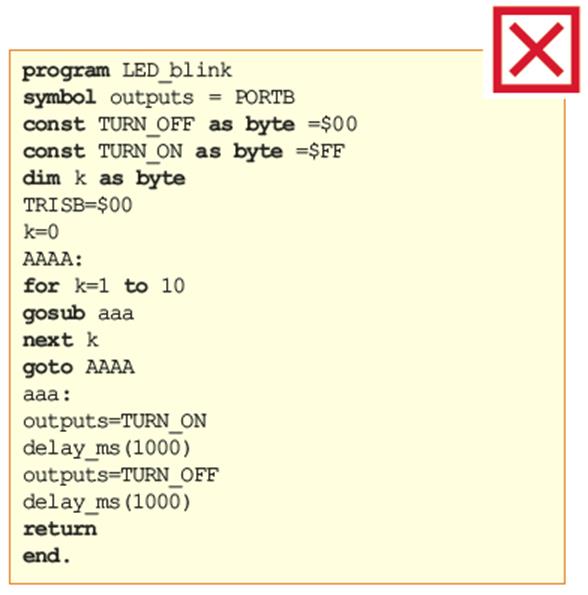
Figure below illustrates the structure of a simple program written in Basic, pointing out the parts it consists of. This is an example of how you should write a program. Differences are more than obvious…
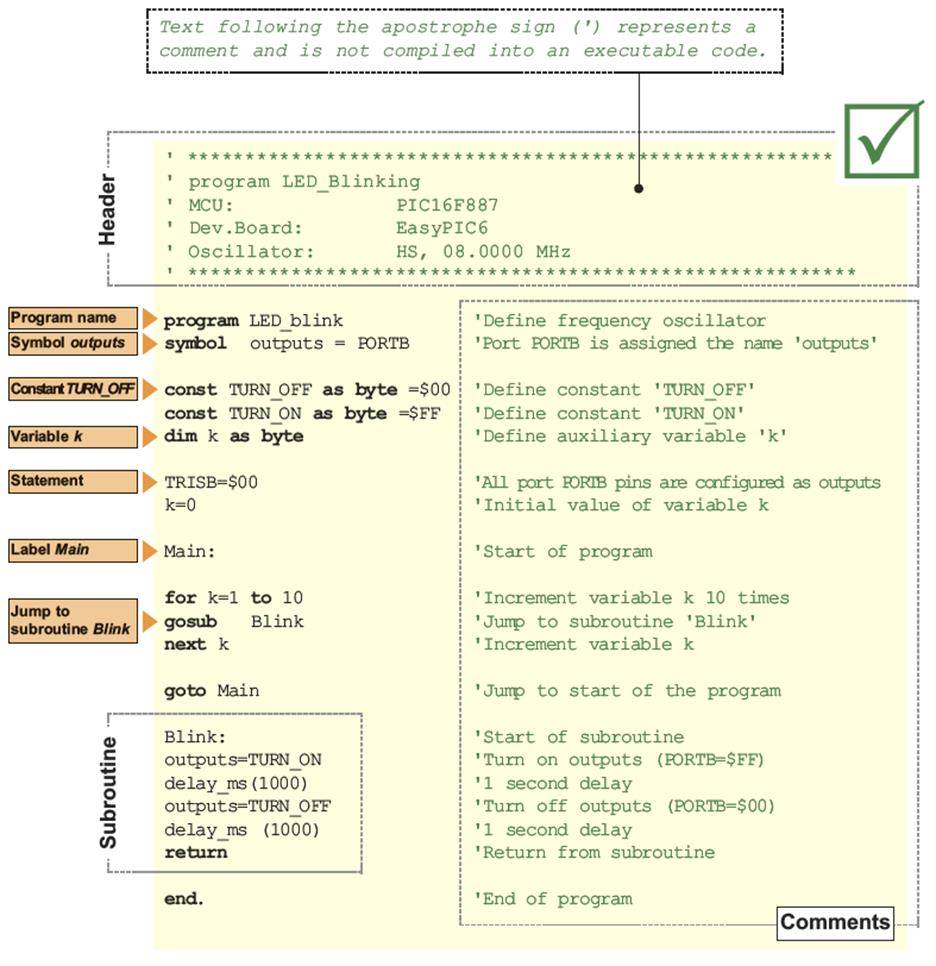
PROGRAM STRUCTURE
Similar to other programming languages, Basic provides a set of strictly defined rules to be observed when writing programs. For a program to be written in Basic, it is necessary to install a software which provides the appropriate work environment and understands these rules on your PC… When you write a letter, you need a word processing program, don’t you? In this case, you need the mikroBasic PRO for PICcompiler. Unlike most programs you have already got used to dealing with, the process of writing programs in the compiler doesn’t start by selecting the File>New option, but Project>New. Why is that? Well, you write a program in a document with the .mbas extension (mikroBasic). You diligently write, write, write… When you compile it into a HEX code, a new document with the .hex extension will be created. At the same time the compiler will automatically create several documents in addition to it. The purpose of these documents is not important at this point. Of course, there must be something to connect them all. You get it – we are talking about a project. The program you write is just a part of it.
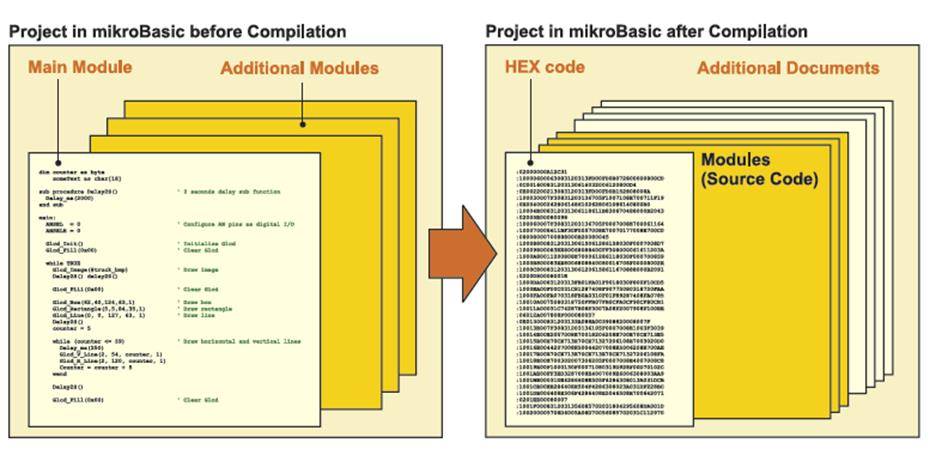
Just to be sure that we are on the same page… From now on the word module refers to a document with the .mbas extension. The text it contains is referred to as a program. Every project written in the mikroBasic PRO for PIC compiler has the .mbppi extension (microBasicProject for PIC) and consists of at least one module (Main Module). Every project in mikroBasic PRO for PIC requires a single main module. It is identified by the keyword program and instructs the compiler from where to start the process of compiling. When you successfully create an empty project in Project Wizard, the main module will be automatically displayed in the Code Editor window:
program MyProject ‘ The main module is called MyProject here
main: ‘ Main procedure
… ‘*
… ‘* Write program code here
… ‘*
end.
Nothing may precede the program keyword, except comments. As mentioned above, the project may also include other modules which, unlike the main one, start with the module keyword.
module MyModule ‘ Auxiliary module is called MyModule
… ‘*
… ‘* Implements
… ‘*
end.
To make the compiler familiar with all modules which belong to one project, it is necessary to specify them in the main module using theinclude keyword followed by a quoted module name. The extension of these files should not be included. Only one module per includeclause is allowed. The number of include clauses is not limited, but they all must be specified immediately after the program (main module) name. Here’s an example:
program MyProgram ‘ Start of program (main module named ‘MyProgram’)
‘ Other modules included are:
include “utils” ‘ Module “utils”
include “strings” ‘ Module “strings”
include “MyUnit” ‘ Module “MyUnit”
…
ORGANIZATION OF THE MAIN MODULE
Basically, the main module can be divided in two sections: declarations and program body. What is a declaration in programming? A declaration is a process of defining the properties of identifiers to be used in the program. Like most other programming languages, Basic also requires all identifiers to be declared prior to being used in the program. Otherwise, the compiler may not be able to interpret them correctly. This is how a declaration of a variable called distance looks like:
dim distance as float ‘ Declare variable distance
As can be seen, it is a floating point variable, i.e. a number with optional decimal places. Two other variables are declared and namedspeed and time. Now, they can be used in the program as follows: This is an example of how to write the main module correctly:
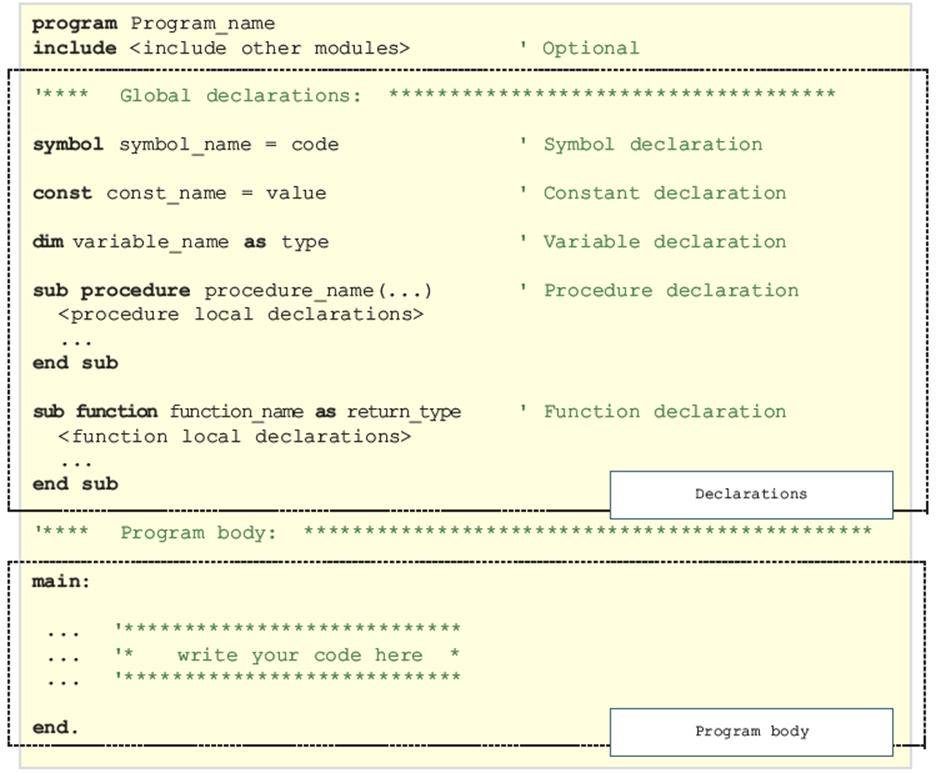
ORGANIZATION OF OTHER MODULES
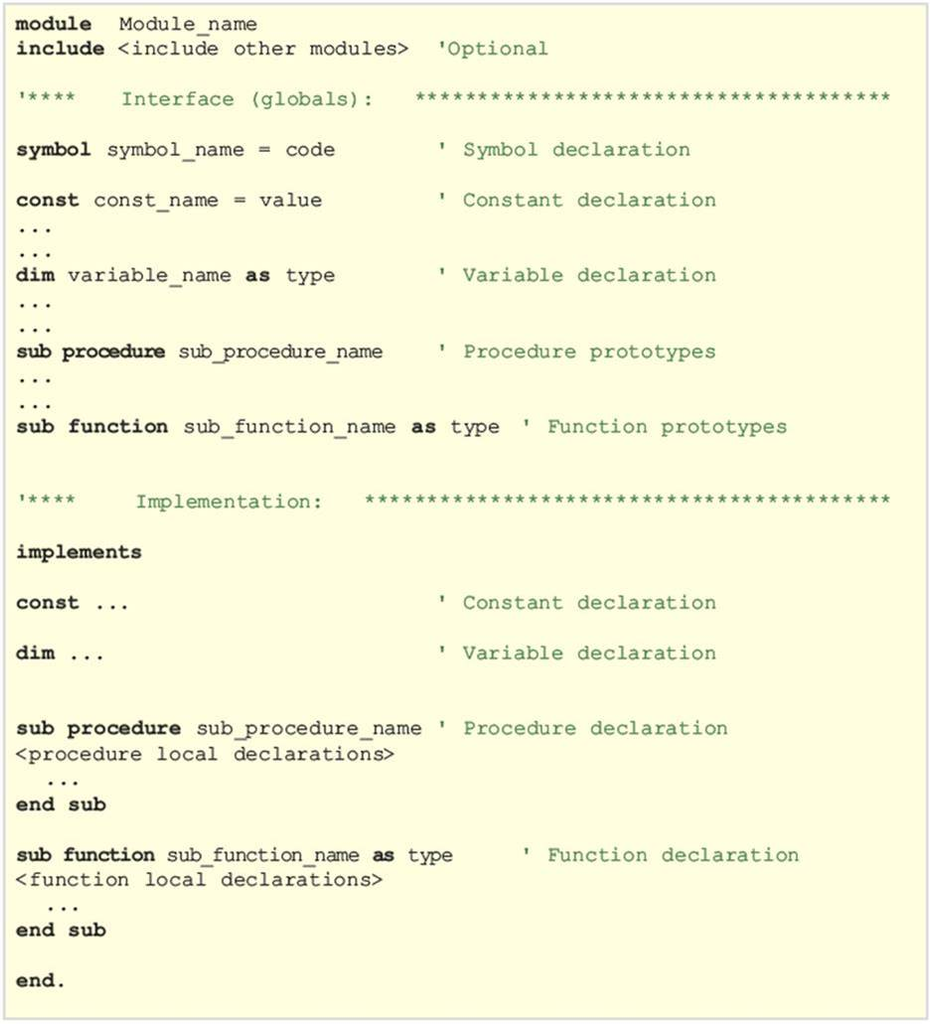
Other modules start with the module keyword. Every module consists of three sections: include, interface and implementation. Only the implementation section is obligatory. It starts with the implements keyword. Follow the example below:
IDENTIFIERS
Identifiers are arbitrary names assigned to the basic language objects such as constants, variables, functions, procedures etc. Somebody just came to an idea to use the word identifier instead of name. As simple as that. Here are a few rules to be observed when using identifiers:
- Identifiers may contain all the letters of alphabet (both upper and lower case), digits (0-9) and the underscore character ( _ ).
- The first character of an identifier must not be a digit.
- No identifier may contain special characters such as ! [{ # $ % & etc.
- Basic is not case-sensitive, which means that FIRST, first and First will be considered identical.
- The ^ (caret) symbol is used to denote an exponentiation operator, the * (asterisk) symbol is used to denote multiplication, while other symbols have their usual meanings.
- Keywords being already used by the compiler must not be used as identifiers The mikroBasic keywords are listed in the following table:
- Abstract
- And
- Array
- As
- At
- Asm
- Assembler
- Automated
- Bdata
- Begin
- Bit
- Case
- Cdecl
- Class
- Code
- Compact
- Const
- Constructor
- Contains
- Data
- Default
- Deprecated
- Destructor
- Dispid
- Dispinterface
- Div
- Do
- Downto
- Dynamic
- Else
- End
- Except
- Export
- Exports
- External
- Far
- File
- Finalization
- Finally
- For
- Forward
- Function
- Goto
- Idata
- If
- Ilevel
- Implementation
- In
- Index
- Inherited
- Initialization
- Inline
- Interface
- Io
- Is
- Label
- Large
- Library
- Message
- Mod
- Name
- Near
- Nil
- Not
- Object
- Of
- On
- Or
- Org
- Out
- Overload
- Override
- Package
- Packed
- Pascal
- Shr
- Shl
- Sfr
- Set
- Sbit
- Safecall
- Rx
- Resourcestring
- Requires
- Repeat
- Reintroduce
- Register
- Record
- Readonly
- Read
- Raise
- Published
- Public
- Protected
- Property
- Program
- Procedure
- Private
- Platform
- Pdata
- Small
- Stdcall
- Stored
- String
- Stringresource
- Then
- Threadvar
- To
- Try
- Type
- Unit
- Until
- Uses
- Var
- Virtual
- Volatile
- While
- With
- Write
- Writeonly
- Xdata
- Xor
A list of identifiers which must not be used in the program.
COMMENTS
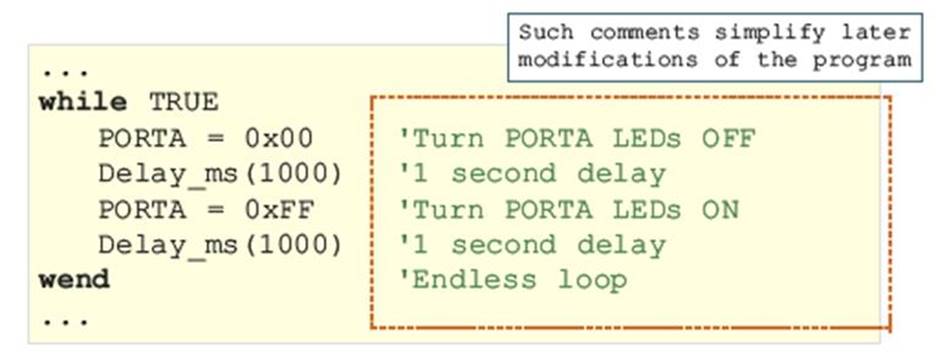
Comments are parts of the program used to provide more information about the program and make it clear to the user. In Basic, any text following a single quotation mark (‘) is considered a comment. Comments are not compiled into executable code. The compiler is capable of recognizing special characters used to mark where comments start and completely ignores the following text during compilation. Even though comments cannot affect the program execution, they are as important as any other part of the program because almost every program needs to be improved, modified, upgraded or simplified at some point. Without comments, it is almost impossible to understand even the simplest programs.
LABELS
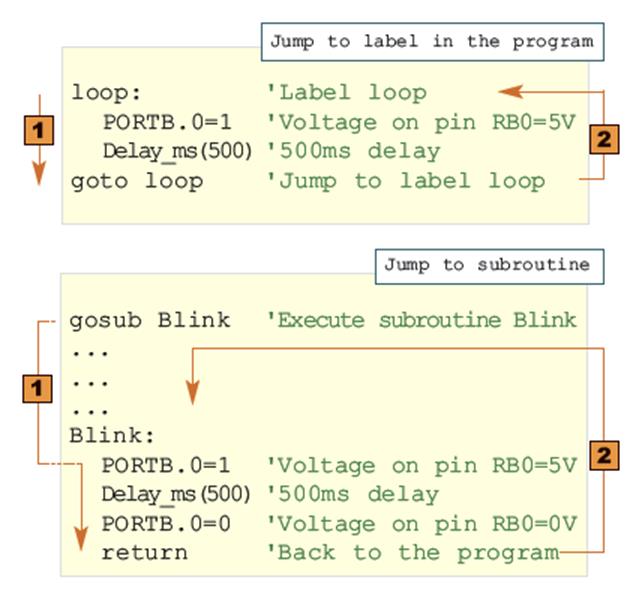
Labels provide the easiest way of controlling the program flow. They are used to mark particular lines in the program where jump instruction and appropriate subroutine are to be executed. All labels must be terminated by ‘:’ so that the compiler can easily recognize them.
CONSTANTS
A constant is a number or a character the value of which cannot be changed during the program execution. Unlike variables, constants are stored in ROM memory of the microcontroller in order to save as much memory space of RAM as possible. The compiler recognizes constants by their names and prefix const. Every constant is declared under unique name which must be a valid identifier. Constants are available in decimal, hexadecimal and binary formats. The compiler distinguishes between them according to their prefixes. If a constant has no prefix, it is considered decimal by default.
| FORMAT | PREFIX | EXAMPLE |
| Decimal | const MAX = 100 | |
| Hexadecimal | 0x or $ | const MAX = 0xFF |
| Binary | Floating point | const MAX = %11011101 |
Constants are declared in the declaration part of the program or routine. The syntax of constants is:
const constant_name [as type] = value
Constant names are usually written in capitals. The type of a constant is automatically recognized by its size. In the following example, the constant MINIMUM is considered a signed integer and will be stored within two bytes of Flash memory (16 bits):
const MINIMUM = -1000 ‘ Declare constant MINIMUM
Type of constant is optionally specified. In the absence of type, the compiler assumes the ‘smallest’ type that can accommodate the constant value.
const MAX as longint = 10000
const MIN = 1000 ‘ Compiler will assume word type
const SWITCH = “n” ‘ Compiler will assume char type
In the following example, a constant named T_MAX is declared so as to have a fractional value 32.60. Now, the program can compare the measured temperature to that constant with a meaningful name instead to number 32.60.
const T_MAX = 32.60 ‘ Declare temperature T_MAX
const T_MAX = 3.260E1 ‘ Another way of declaring constant T_MAX
A string constant consists of a sequence of characters. They are enclosed within double quotation marks. A blank space may also be included in the string constant as a character. String constants are used to represent non-numeric quantities such as names, addresses, messages etc.
const Message_1 = “Press the START button” ‘ Message 1 for LCD
const Message_2 = “Press the RIGHT button” ‘ Message 2 for LCD
const Message_3 = “Press the LEFT button” ‘ Message 3 for LCD
In this example, sending the Message_1 constant to an LCD will cause the message ‘press the START button’ to be displayed.
VARIABLES
A variable is a named object able to contain a data which can be modified during program execution. Every variable is declared under a unique name which must be a valid identifier. For example, to add two numbers (number1 + number2) in the program, it is necessary to have a variable to represent what we in everyday life call the sum. In this case number1, number and sum are variables. The syntax of one single variable declaration is as follows:
dim variable_name as type
Variables in Basic are typed, which means that it is necessary to specify the type of data a variable is to receive. Variables are stored in RAM and the memory space occupied (in bytes) depends on their type. In addition to single declarations, variables of the same type can be declared as a list. Here, identifier_list is a comma-delimited list of valid identifiers, whereas type can be any data type.
dim i, j, k as byte ‘Define variables i, j, k
dim counter, temp as word ‘Define variables counter and temp
SYMBOLS
Symbols in Basic allow you to create simple macros without parameters. It means that any code line may be replaced with one single identifier. Symbols, when used properly, can increase code legibility and reusability. Symbols are declared at the beginning of the module, right after the module name and optional include directive. The scope of a symbol is always limited to the module in which it has been declared.
symbol symbol_name = code
Here, symbol_name must be a valid identifier to be used throughout the code. The code specifier can be any code line (literals, assignments, function calls, etc).
symbol MAXALLOWED = 216 ‘ Symbol MAXALLOWED for numeric value
symbol OUT = PORTA ‘ Symbol OUT for SFR
symbol MYDELAY = Delay_ms(762) ‘ Symbol MYDELAY for procedure call
dim cnt as byte ‘ Variable cnt
main:
if cnt > MAXALLOWED then ‘ Program checks whether cnt > 216
cnt = 0 ‘ If yes,
OUT.1 = 0 ‘ the following three commands
MYDELAY ‘ are to be executed
end if
… ‘ If not, program continues here
No RAM memory space is used for storing symbols being used in the program. The compiler will simply replace all symbols with appropriate code lines assigned to them when declared.
BASIC LANGUAGE DATA TYPES
There are several data types that can be used in the Basic programming language. Table below shows the range of values these data may have when used in their basic form.
| DATA TYPE | DESCRIPTION | SIZE (NUMBER OF BITS) | RANGE OF VALUES |
| bit | One bit | 1 | 0 or 1 |
| sbit | One bit | 1 | 0 or 1 |
| byte, char | Character | 8 | 0 … 255 |
| short | Signed short integer | 8 | -127 … 128 |
| word | Unsigned integer | 16 | 0 … 65535 |
| integer | Signed integer | 16 | -32768 … 32767 |
| longword | 32-bit word | 32 | 0 … 4294967295 |
| longint | 32-bit signed word | 32 | -2147483648 … 2147483647 |
| float | Floating point | 32 | ±1.17549435082*10-38 … ±6.80564774407*1038 |
AUTOMATIC DATA TYPE CONVERSION
The compiler automatically performs implicit conversion in the following situations:
- if a statement requires an expression of particular type, but expression of different type is used;
- if an operator requires an operand of particular type, but operand of different type is used;
- if a function requires a formal parameter of particular type, but is assigned an object of different type; and
- if a function result does not match the declared function return data type.
PROMOTION
When operands are of different types, implicit conversion promotes a less complex to a more complex type as follows:
- bit → byte
- short, byte/char → integer, word, longint, longword
- integer, word → longint, longword
- short, byte/char, integer, word, longint, longword → float
DATA CLIPPING
In assignment statements and statements requiring an expression of particular type, the correct value will be stored in destination only if the result of expression doesn’t exceed the destination range. Otherwise, if expression evaluates to a more complex type than expected, the excess data will simply be clipped, i.e. higher bytes will be lost.
dim i as byte ‘ Variable i occupies one byte of RAM
dim j as word ‘ Variable j occupies two bytes of RAM
…
j = $FF0F
i = j ‘ i becomes $0F, higher byte $FF is lost
EXPLICIT DATA TYPE CONVERSION
Explicit conversion may be executed upon any expression at any point by writing desired type keyword (byte, word, short, integer, longint, float…) before the expression to be converted. The expression must be enclosed in parentheses. Explicit conversion cannot be performed upon the operand to the left of the assignment operator.
a = word(b) ‘ Explicit conversion of expression b
word(b) = a ‘ Compiler will report an error
A special case of explicit conversion is a conversion between signed and unsigned data types as it does not affect the binary representation of data.
dim a as byte
dim b as short
‘…
b = -1
a = byte(b) ‘ a is 255, not -1
‘ Data doesn’t change its binary representation %11111111
‘ it is just interpreted differently by the compiler
OPERATORS
An operator is a symbol used to denote particular arithmetic, logic or some other operation. Every operation is performed upon one or more operands (variables or constants) in an expression. Besides, every operator features priority execution and associativity. If an expression contains more than one operand, the order of their execution is determined by the level of their priority. There are four priority categories in Basic. Operators belonging to the same category have equal priority. If two or more operators have the same priority level, the operations are performed from left to right. Parenthesis can be used to define the priority of the operation within an expression. Each category is assigned either left-to-right or rightto- left associativity rule. Refer to the table below.
| PRIORITY | OPERATORS | ASSOCIATIVITY |
| High | @ not + – | from right to left |
| * / div mod and << >> | from left to right | |
| + – or xor | from left to right | |
| Low | = <> < > <= >= | from left to right |
ARITHMETIC OPERATORS
Arithmetic operators are used to perform arithmetic operations. These operations are performed upon numeric operands and always return numerical results. Binary operations are performed upon two operands, whereas unary operations are performed upon one operand. All arithmetic operators associate from left to right.
| OPERATOR | OPERATION |
| + | Addition |
| – | Subtraction |
| * | Multiplication |
| / | Division – floating point |
| div | Division – round down |
| mod | Reminder |
DIVISION BY ZERO
If a zero (0) is used explicitly as the second operand in the division operation (x div 0), the compiler will report an error and will not generate a code. In case of implicit division where the second operand is an object the value of which is 0 (x div y, where y=0), the result will be undefined.
RELATIONAL OPERATORS
Relational operators are used to compare two variables and determine the validity of their relationship. In mikroBasic, all relational operators return 255 if the expression is true, or zero (0) if it is false. The same applies in expressions such as ‘if the expression is true then…’
| OPERATOR | MEANING | EXAMPLE | TRUTH CONDITION |
| > | is greater than | b > a | if b is greater than a |
| >= | is greater than or equal to | a >= 5 | If a is greater than or equal to 5 |
| < | is less than | a < b | if a Is less than b |
| <= | is less than or equal to | a <= b | if a Is less than or equal to b |
| = | is equal to | a = 6 | if a Is equal to 6 |
| <> | is not equal to | a <> b | if a Is not equal to b |
LOGIC BITWISE OPERATORS
Logic bitwise operators are performed upon bits of an operand. They associate from left to right. The only exception is the bitwise complement operator not which associates from right to left. Bitwise operators are listed in the table on the right: The bitwise operators and, or and xor perform logic operations upon appropriate pairs of bits of operands. The not operator complements each bit of one single operand.
| OPERAND | MEANING | EXAMPLE | RESULT | |
| << | Shift left | A = B << 2 | B = 11110011 | A = 11001100 |
| >> | Shift right | A = B >> 3 | B = 11110011 | A = 00011110 |
| and | Bitwise AND | C = A and B | A=11100011 B=11001100 | C = 11000000 |
| or | Bitwise OR | C = A or B | A=11100011 B=11001100 | C = 11101111 |
| not | Bitwise NOT | A = not B | B = 11001100 | A = 00110011 |
| xor | Bitwise EXOR | C = A xor B | A = 11100011 B = 11001100 | C = 00101111 |
The bitwise operators and, or and xor perform logic operations upon appropriate pairs of bits of operands. The not operator complements each bit of one single operand.
$1234 and $5678 ‘ result is $1230 because:
‘ $1234 : 0001 0010 0011 0100
‘ $5678 : 0101 0110 0111 1000
‘ —————————-
‘ and : 0001 0010 0011 0000 … that is, $1230
$1234 or $5678 ‘ equals $567C
$1234 xor $5678 ‘ equals $444C
not $1234 ‘ equals $EDCB
BITWISE SHIFT OPERATORS
There are two shift operators in mikroBasic. These are the << operator which moves bits to the left and the >> operator which moves bits to the right. Both operators have two operands each. The left operand is an object to move, whereas the right operand is a number of positions to move the object by. Both operands must be of integral type. The right operand must be a positive value. By shifting an operand left (<<), the leftmost bits are discarded, whereas ‘new’ bits on the right are assigned zeroes. Shifting unsigned operand to the left by n positions is equivalent to multiplying it with 2n. The same applies to signed operands if all discarded bits are equal to the sign bit.
dim num as word ‘ declare variable num as word
num = 1 ‘ asign it decimal value 1 (00000000 00000001 bin.)
num << 5 ‘ equals 32 (00000000 00100000 bin.)
By shifting operand right (>>), the rightmost bits are discarded, whereas ‘new’ bits on the left are assigned zeroes (in case of unsigned operand) or the sign bit (in case of signed operand). Shifting operand to the right by n positions is equivalent to dividing it by 2n.
dim num as integer ‘ declare variable num as signed integer
num = 0xFF56 ‘ asign it hex value FF56 (11111111 01010110 bin.)
num >> 4 ‘ equals 0xFFF5 (11111111 11110101 bin.)
CONDITIONAL STATEMENTS
Conditions are common ingredients of a program. They enable one or a number of statements to be executed depending on the validity of an expression. In other words ‘If the condition is met (…), do (…). Otherwise, do (…)’. A conditional statement can be followed either by a single statement or by a block of statements to execute.
CONDITIONAL STATEMENT IF
The syntax of a simple form of the if statement is:
if expression then
operations
end if
If the result of expression is true (not 0), operations are performed, then the program proceeds with execution. If the result of expression is false (0), operations are not performed and the program immediately proceeds with execution. The if operator can also be used in combination with else operators:
if expression then
operations1
else
other operations2
end if
If the result of expression is true (not 0), operations1 are performed, otherwise operations2 are performed. The program proceeds with execution after these operations are performed.
NESTED IF STATEMENTS
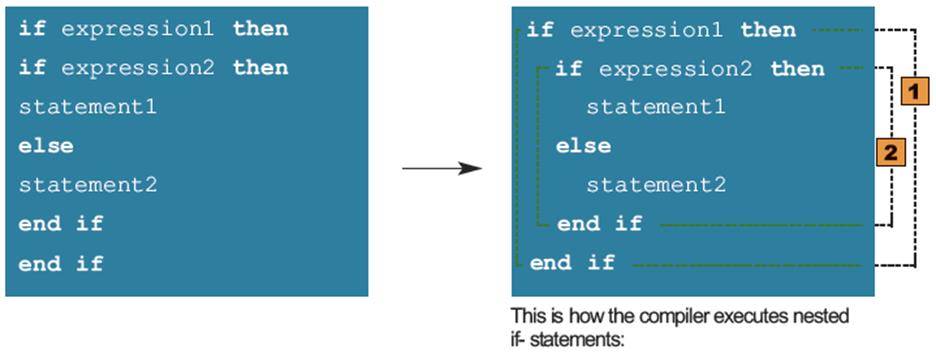
Nested if statement need additional attention. A nested if-statement is a statement used inside the other if-statement. As a rule, they are parsed starting from the most nested ifstatement, whereas each else statement is bound to the nearest available if on its left:
SELECT CASE STATEMENT
The select case statement is a conditional statement with multiple branching. It consists of a selector expression (condition) and a list of possible values of that expression. The syntax of the select case statement is: The selector specifier is an expression which should evaluate as integral value. Specifiers value_1…value_n represent selector’s possible values and can be literals, constants or constant expressions. Specifiers statements_1 …statements_n can be any statements. The case else clause is optional. First, the selector expression is evaluated. It is then compared to all available values. If the match is found, the statements following the match evaluate and the select case statement terminates. If there are multiple matches, statements following the first match will be executed. If none of the values matches the selector, then default_statements in the case else clause (if there is one) are executed. Here is an example of the select case statement:
select case decimal_digit ‘ Decimal-digit value is being checked
case 0
mask = %01111110 ‘ Display “0”
case 1
mask = %00110000 ‘ Display “1”
case 2
mask = %01101101
case 3
mask = %01111001
case 4
mask = %00110011
case 5
mask = %01011011
case 6
mask = %01011111
case 7
mask = %01110000
case 8
mask = %01111111
case 9
mask = %01111011
end select
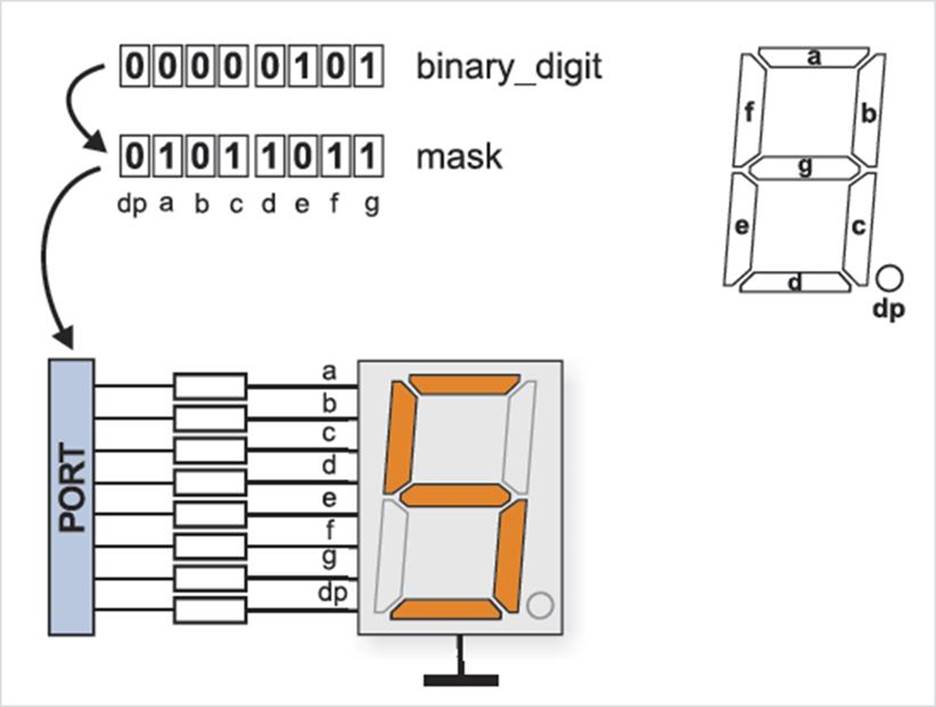
This program routine converts decimal digits into appropriate binary combination on the port in order to display them on an LED display.
PROGRAM LOOPS
Some instructions (operations) have to be executed more than once in the program. A set of commands being repeated makes a program loop. How many times it will be executed, i.e. how long the program will stay within a loop, depends on the conditions to leave the loop.
WHILE LOOP
The while loop is implemented when the number of iterations is not specified. It is necessary to check the iteration condition before a loop execution. Simply put, the while loop is executed while all necessary conditions for its execution are met… The syntax of the while loop looks as follows:
while expression
statements
wend
The statements specifier represents a group of statements which are executed repeatedly as long as the value of the expression specifier which represents an expression is true. In other words, the program remains in the loop until expression becomes false. The value of expression is checked before the next iteration is executed. Accordingly, if it is false before entering the loop, no iterations executes, i.e. statements will never be executed. The program will proceed with execution from the end of the while loop (from instructions following the wend instruction). A special type of the program loop is an endless loop. It is created if the condition to exit loop remains unchanged within the loop. In this case, the execution is simple as the result in brackets is always true (1 will allways be different from 0), which means that the program remains in the loop.
while 1 ‘ ‘true’ can be written instead of ‘1’
… ‘ Expressions will be unceasingly executed (endless loop)
…
wend
FOR LOOP
The for loop is implemented when the number of iterations is specified. The syntax of the for loop looks as follows:
for counter = initial_value to final_value [step step_value]
statements
next counter
Here, with each iteration of the loop, the counter variable is incremented by step_value. The step_value parameter is an optional integer value, considered 1 if omitted. Before the first iteration, the counter (counter) is set to its initial value (initial_value) and will be incremented until it reaches or exceeds the final value (final_value). Statements will be executed with each iteration. Iinitial_value and final_value should be expressions compatible with the counter, whereas the statements specifier can be any statement that doesn’t change the counter value. Note that the step_value parameter may be negative, thus enabling a countdown.
for k=1 to 5 ‘ Increase variable k five times (from 1 to 5) and
operation ‘ keep on executing “operation” every time
…
next k
A set of instructions (operation) will be executed five times. After that, it will be determined that the k<5 is false (after 5 iterations k=5) and the program will exit the for loop.
DO LOOP
The do loop is implemented when the number of iterations is not specified. The loop is executed repeatedly until the expression evaluates to true. The syntax of the do loop is:
do
statements
loop until expression
In this case, the statements specifier represents a group of statements which are executed as long as the expression (expression) is true. The loop conditions are checked at the end of the loop, so the loop is executed at least once regardless of whether the condition is true or false. In the following example, the program remains in the do loop until variable a reaches 1E06 (a million iterations).
a = 0 ‘ Set initial value
do
a = a+1 ‘ Operation in progress
loop until a <= 1E06 ‘ Check condition
WRITING CODE IN ASSEMBLY LANGUAGE
Sometimes a program in Basic requires parts of the code to be written in assembly language. In this way some parts of the program can be executed in a precisely defined way for exact period of time. For example, when it is necessary to provide very short pulses (a few microseconds) to appear periodically on a microcontroller pin, the best solution is to write an assembly code for pulse duration control. The asm command is used to introduce one or more assembly instructions to the program written in Basic:
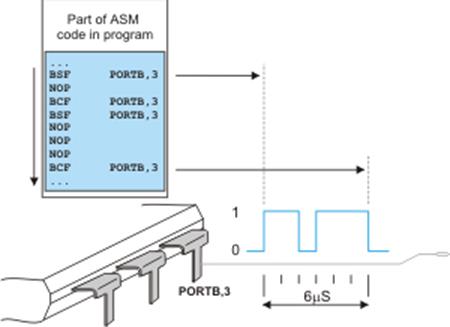
asm
Assembly language instructions
…
end asm
Assembly instructions may use objects (constants, variables, routines etc.) that must be previously declared in the Basic language. It goes without saying that these objects are declared according to the rules of the Basic language. Refer to the example below:
ARRAYS
An array is a finite and arranged list of variables of the same type called elements. This type is called the base type. Each element is assigned a unique index so that different elements may have the same value. An array is declared by specifying the type of its elements (called array type), its name and the number of its elements enclosed within brackets:
dim array_name as component_type [number_of_components]
Elements of an array are identified by their position. Indices go from 0 (the first element of an array) to N-1 (N is the number of elements contained in an array). The compiler must know how many memory locations to allocate when an array is declared and because of that the array size can’t be variable.
| ELEMENTS OF ARRAY | CONTENTS OF ELEMENT |
| shelf[0] | 7 |
| shelf[1] | 23 |
| shelf[2] | 34 |
| shelf[3] | 0 |
| shelf[4] | 0 |
| shelf[5] | 12 |
| shelf[6] | 9 |
| … | … |
| … | … |
| shelf [99] | 23 |
To illustrate it, an array can be thought of as a shorter or longer list of variables of the same type where each of these is assigned an ordinal number always starting from zero. Such an array is called a vector. Table on the right shows an array named shelf which consists of 100 elements. In this case, the contents of a variable (element) represents a number of products the shelf contains. Elements are accessed by indexing, i.e. by specifying their indices enclosed in square brackets:
dim shelf as byte [100] ‘ Declare the array “shelf” with 100 elements
shelf [4] = 12 ‘ 12 items are ‘placed’ on shelf [4]
temp = shelf [1] ‘ Variable shelf [1] is copied to
‘ variable temp
In constant arrays, elements can be assigned their contents during array declaration. In the following example, an constant array named CALENDAR is declared and each element is assigned specific number of days:
const CALENDAR as byte [12]= (31,28,31,30,31,30,31,31,30,31,30,31)
The number of assigned values must not exceed the specified array length, but can be less. In this case, the trailing ‘excess’ elements will be assigned zeroes.
GOTO STATEMENT
The goto statement enables you to make an absolute jump to another point in the program. Be careful when using this statement since its execution causes an unconditional jump ignoring any type of nesting limitations. The destination point is identified by a label, which is used as an argument for the goto statement. A label consists of a valid identifier followed by a colon (:).The syntax of the goto statement is:
goto: label_name
This statement executes a jump to the label_name specifier which represents a label. The goto statement can precede or follow the label. Hence it is not possible to jump into or out of a procedure or function. The goto statement can be used to break out from any level of nested structures. It is not advisable to jump into a loop or other structured statement as it may give unexpected results.
GOSUB STATEMENT
A subroutine is a portion of code within a larger program executed upon demand. It performs a specific task and is relatively independent from the rest of code. The interpreter will jump to the subroutine, execute it, and return to the main program. Keywords gosub and return are used in the Basic language to denote start and end of subroutine.
gosub label_name
…
…
…
label_name:
…
return
Subroutines are considered by many to be hard to maintain, difficult to read and digest, just like the goto statement. Use them just if you don’t have any better solution.
ACCESSING INDIVIDUAL BITS
Compiler mikroBasic PRO for PIC, installed on your PC, includes a list of supported PIC microcontrollers with all registers, their accurate addresses and bit names. The compiler allows you to access individual bits of these registers by their names, without specifying their positions (the compiler already ‘knows’ them). There are a number of ways to access and modify one individual bit within a register. Let’s access the GIE bit (Global Interrupt Enable bit) for example. It’s the seventh bit of the INTCON register. One way to access this bit by its name is to write the following:
INTCON.GIE = 0 ‘ Clear Global Interrupt Enable Bit (GIE)
Instead of a bit name, a variable, constant, function call or an expression enclosed within parentheses may be used to denote the position of bit in a register. In addition, for individual bit access there are predefined global constants B0, B1, … , B7, or 0, 1, … 7, where 7 is considered the most significant bit.
INTCON.B0 = 0 ‘ Clear bit 0 of the INTCON register
ADCON0.5 = 1 ‘ Set bit 5 of the ADCON0 register
i = 5
STATUS.(i+1) = 1 ‘ Set bit 6 of the STATUS register
Finally, a desired bit may be accessed by using its alias name. In this case it’s the GIE_bit:
GIE_bit = 1 ‘ Set Global Interrupt Enable Bit (GIE)
SBIT TYPE
The mikroBasic PRO for PIC compiler has the sbit data type. This is the shortest data type referring to one single bit. If type sbit is assigned to a variable, the appropriate bit of some register will be changed by changing that variable without specyfing the register name and location. The sbit variable will behave like a pointer. In order to declare the sbit variable, it is sufficient to write:
dim Bit_name as sbit at Register_name.Bit_position
program MyProgram ‘ Main module
…
dim Output1 as sbit at PORTB.0 ‘ Variable Output1 is of sbit type
…
Output1 = 1 ‘ Pin PORTB.0 is set (5V)
BIT TYPE
The mikroBasic PRO for PIC compiler provides the bit data type that may be used for variable declarations.
dim bf as bit
Unlike variables of sbit type, only the bit name is declared here, whereas the compiler stores bit-variable into some of the free registers of RAM. As can be seen, it is not necessary to specify a bit of some specific register. The exact location of the variable of bit type is unknown to the user. Bit and sbit types are implemented with the following limitations:
- Cannot be used for argument lists and as function return values
- Cannot be used as a member of structures
- Cannot be used as array elements
- Cannot be initialized
- Cannot be pointed to
- Their addresses cannot be red, therefore the unary operator @ cannot be used with variable of this type
dim ptr as ^bit ‘ invalid
dim arr as array[5] of bit ‘ invalid
PROCEDURES AND FUNCTIONS
Functions and procedures, collectively referred to as routines, are subprograms (selfcontained statement blocks) which perform a certain task based on a number of input parameters. Functions return a value after execution, while procedures don’t.
PROCEDURES
A procedure is a named block of code, i.e. a subroutine with some additional features. For example, it can accept parameters. Procedures are declared as follows:
sub procedure procedure_name(parameter_list)
[ local declarations ]
procedure body
end sub
https://nvlpubs.nist.gov/nistpubs/Legacy/FIPS/fipspub68-2-Jan1987.pdf
References:
https://nvlpubs.nist.gov/nistpubs/Legacy/FIPS/fipspub68-2-Jan1987.pdf
https://bitsavers.org/pdf/phaseOneSystems/oasis/BASIC_Language_Reference_Manual_Mar80.pdf